Подведи собственные итоги года совместно с YOUGAME и забери ценные призы! Перейти

Вопрос Menu search function

  • Автор темы Автор темы BestChen
  • Дата начала Дата начала
Начинающий
Начинающий
Статус
Оффлайн
Регистрация
22 Окт 2019
Сообщения
32
Реакции
19
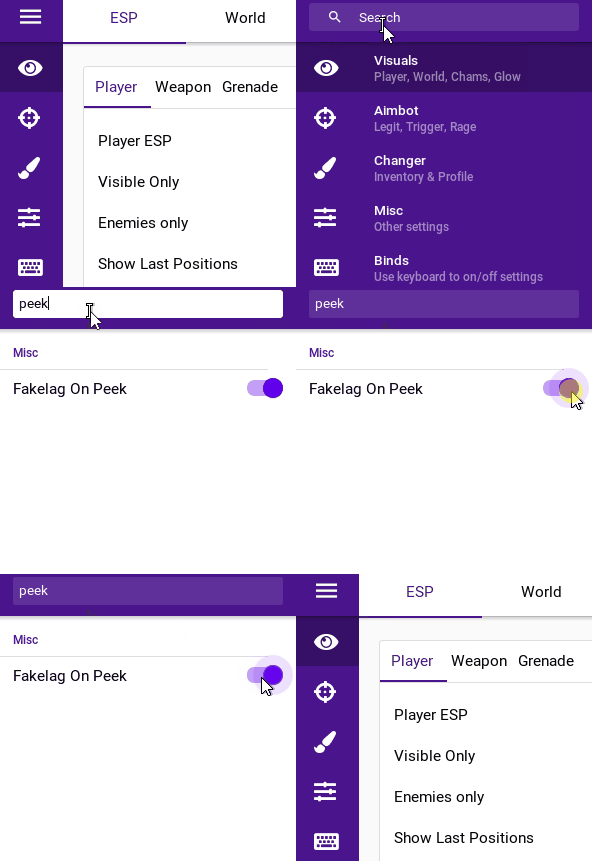
How to realize the menu search function?

like this

qW4aG.gif
 
How to realize the menu search function?

like this

qW4aG.gif
I would use some custom class like this:
C++:
Expand Collapse Copy
class Settings {
  public:
    Settings() {
        Initialize();
    }

    void AddCheckbox(const std::string& label, bool* value_ptr) {
        checkboxes_.push_back(std::make_tuple(label, value_ptr));
    }

    void AddSliderInt(const std::string& label, int* value_ptr, int min_value, int max_value, const std::string& format) {
        slider_ints_.push_back(std::make_tuple(label, value_ptr, min_value, max_value, format));
    }

    // Predicate (you can change it to fit your requirements)
    bool IsStringFitQuery(const std::string& query, const std::string& str) {
        return std::search(str.begin(), str.end(), query.begin(), query.end(),
            [](char lhs, char rhs) { return std::toupper(lhs) == std::toupper(rhs); }) != str.end();
    }

    // Method, that finds acceptable settings and "draws" them
    void DrawSettingsThatFitQuery(const std::string& query) {
        for (const auto& checkbox_args : checkboxes_) {  // Or you can use structured binding here, if it's more comfortable for you
            if (IsStringFitQuery(query, std::get<0>(checkbox_args))) {
                ImGui::Checkbox(std::get<0>(checkbox_args), std::get<1>(checkbox_args));
            }
        }

        for (const auto& slider_int_args : slider_ints_) {  // Or you can use structured binding here, if it's more comfortable for you
            if (IsSettingFitQuery(query, std::get<0>(slider_int_args ))) {
                ImGui::Checkbox(std::get<0>(slider_int_args), std::get<1>(slider_int_args), std::get<2>(slider_int_args), std::get<3>(slider_int_args), std::get<4>(slider_int_args));
            }
        }

        // etc.
    }

  private:
      void Initialize() {
        AddCheckbox("Findable Bool", &findable_bool);
        AddCheckBox("Also Findable Bool", &also_findable_bool);
      
        AddSliderInt("Findable Int", &findable_int, 1, 100, "%d ints");
        AddSliderInt("Also Findable Int", &also_findable_int, 1, 420, "%d ints here");
    }

    // Vectors holding "findable" settings
    std::vector<std::tuple<std::string, bool*>> checkboxes_;
    std::vector<std::tuple<std::string, int*, int, int, std::string>> slider_ints_;
    // etc.
  
    // Settings data
    bool findable_bool{true};
    bool also_findable_bool{false};
  
    int findable_int{1};
    int also_findable_int{69};
  
    // You can also have some settings that will be "unfindable"
    bool unfindable_bool{false};
    int unfindable_int{0};
    // etc.
};


Code has enough comments to understand how does it work, so if you understand modern c++ and imgui at least a bit more than a beginner you should understand how to use it. Otherwise I spent my time for nothing :(

P.S. I wrote it without even compiling, because I am lazy. But again, if you are not a complete beginner you can fix possible errors
 
I would use some custom class like this:
C++:
Expand Collapse Copy
class Settings {
  public:
    Settings() {
        Initialize();
    }

    void AddCheckbox(const std::string& label, bool* value_ptr) {
        checkboxes_.push_back(std::make_tuple(label, value_ptr));
    }

    void AddSliderInt(const std::string& label, int* value_ptr, int min_value, int max_value, const std::string& format) {
        slider_ints_.push_back(std::make_tuple(label, value_ptr, min_value, max_value, format));
    }

    // Predicate (you can change it to fit your requirements)
    bool IsStringFitQuery(const std::string& query, const std::string& str) {
        return std::search(str.begin(), str.end(), query.begin(), query.end(),
            [](char lhs, char rhs) { return std::toupper(lhs) == std::toupper(rhs); }) != str.end();
    }

    // Method, that finds acceptable settings and "draws" them
    void DrawSettingsThatFitQuery(const std::string& query) {
        for (const auto& checkbox_args : checkboxes_) {  // Or you can use structured binding here, if it's more comfortable for you
            if (IsStringFitQuery(query, std::get<0>(checkbox_args))) {
                ImGui::Checkbox(std::get<0>(checkbox_args), std::get<1>(checkbox_args));
            }
        }

        for (const auto& slider_int_args : slider_ints_) {  // Or you can use structured binding here, if it's more comfortable for you
            if (IsSettingFitQuery(query, std::get<0>(slider_int_args ))) {
                ImGui::Checkbox(std::get<0>(slider_int_args), std::get<1>(slider_int_args), std::get<2>(slider_int_args), std::get<3>(slider_int_args), std::get<4>(slider_int_args));
            }
        }

        // etc.
    }

  private:
      void Initialize() {
        AddCheckbox("Findable Bool", &findable_bool);
        AddCheckBox("Also Findable Bool", &also_findable_bool);
     
        AddSliderInt("Findable Int", &findable_int, 1, 100, "%d ints");
        AddSliderInt("Also Findable Int", &also_findable_int, 1, 420, "%d ints here");
    }

    // Vectors holding "findable" settings
    std::vector<std::tuple<std::string, bool*>> checkboxes_;
    std::vector<std::tuple<std::string, int*, int, int, std::string>> slider_ints_;
    // etc.
 
    // Settings data
    bool findable_bool{true};
    bool also_findable_bool{false};
 
    int findable_int{1};
    int also_findable_int{69};
 
    // You can also have some settings that will be "unfindable"
    bool unfindable_bool{false};
    int unfindable_int{0};
    // etc.
};
Code has enough comments to understand how does it work, so if you understand modern c++ and imgui at least a bit more than a beginner you should understand how to use it. Otherwise I spent my time for nothing :(

P.S. I wrote it without even compiling, because I am lazy. But again, if you are not a complete beginner you can fix possible errors
thx
 
Назад
Сверху Снизу